


جلكان
4.715.00 Reviews
App Specs
- Version
- 1.0.4
- Updated On
- License
- Free
- Downloads
- 50,000+
- Developer
- TNLMS
- Categories
- Auto & Vehicles
- Platform
- Android
Screenshots
 Analysis by AppCompare
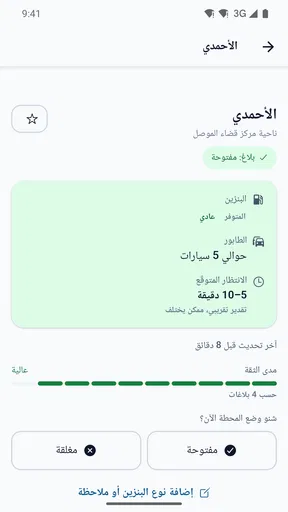
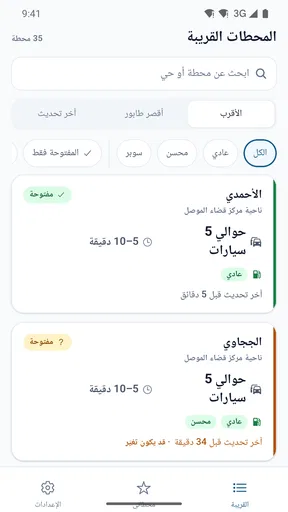
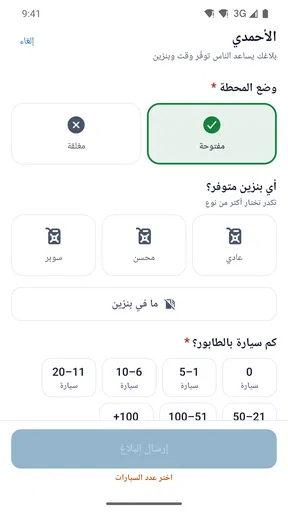
When a household is trying to find fuel in Mosul, the annoying part is often not knowing whether a station is operating or how long the queue might be. جلكان is built around that local, practical problem. I see its value less as a general driving companion and more as a shared reference: a driver can check station status, get a sense of the line, and consider when that information was last checked before deciding where to go.
That narrow focus is a strength, but it also sets expectations. This is an Auto & Vehicles app from TNLMS, not a navigation service or a broad directory of motoring tools. Its usefulness depends on having current, relevant information for the part of Mosul you need. I would treat it as a way to make a better-informed choice, not as a guarantee that a pump will be available when I arrive.
Useful when a driver can check before leaving
Before a driver sets off, I’d use the station status as a prompt to make a quick, shared decision rather than as a guarantee. The last-checked time can help everyone judge whether the report is still worth acting on, especially when plans shift or another person takes over the trip. That small habit makes the next step—coordinating with another driver—more thoughtful and less dependent on a vague secondhand update.
A small check that can change the trip
The most convincing use case is an ordinary one: someone is about to head out, fuel is running low, and the nearest familiar station may be busy or closed. Instead of driving there on habit, they can look at the reported status and queue length first. Even an imperfect indication can help a driver compare the likely inconvenience of stopping nearby with the cost of going farther.
For a shared car, that check can save more than one person from repeating the same guesswork. A family member who is already out can look before the next driver leaves, or a household can agree on a station based on what appears current. The app is especially relevant when fuel stops are the main purpose of a short trip, rather than a minor detour on a longer route.
There is a useful detail in the way the information is framed: knowing when a station was last checked matters nearly as much as seeing whether it is marked open. If a report is old, I would be cautious about relying on it, especially during a busy period or when I have little fuel left. A recent check gives me more confidence, but it still describes a moment in time, not a promise about the queue at arrival.
How I would use it with another driver
On a shared device, I would make the person who is actually making the trip the final decision-maker. One household member can check the app and tell the driver what the listing shows, but the driver should weigh that against distance, traffic, and how much fuel remains. That simple division avoids treating a quick status check as an instruction to take a particular route.
Worth Reading Before You Choose

Flipboard Shows What News Apps Must Do Beyond the Feed

Switching to Android Auto Means Rethinking Your Driving Routine

Google Calendar Makes a Crowded Week Easier to Manage

Ludo King Makes the Most of the Minutes Between Plans

Baby Panda World Brings Quick Play to Modern Phones, but Its Game Library Feels Busy

ESPN’s Live Game View Makes Following Close Games Easier
A practical routine is to check shortly before setting off, compare the displayed queue and last-check timing, and then decide whether the information is fresh enough to act on. If it is not, I would fall back to a familiar station or another way of checking locally rather than make a long detour based on stale information. This is a sensible habit for any changing local report, and it is particularly important when several people are relaying what they saw at different times.
That workflow also helps prevent a common coordination mix-up: one person may remember that a station was open earlier and assume it remains so later. Looking at the latest check before the driver leaves makes the decision more deliberate. The app’s core value is therefore not just the status itself; it is the chance to make a fuel stop a shared, timely decision instead of a repeated guess.
For example, if one person is finishing work and another is preparing to collect them, the second driver can check the station information before starting the car. They can pass along the reported queue and the time it was checked, then choose whether to stop on the way or use a known alternative. That small exchange is more useful than forwarding a bare “go there” message, because it leaves room for the driver to account for a delay or a change in plans.
Where it differs from maps and word of mouth
Usual alternatives solve adjacent problems. A map is good for finding a route or locating places, while a call or message to someone nearby can provide a direct update if that person has current knowledge. جلكان is more specifically aimed at the fuel question: whether a station is open, how long the queue appears to be, and how recent the check was. For someone choosing among local stations, that focus may be more useful than a general map alone.
The trade-off is that a focused report should not replace navigation or local judgement. If I need turn-by-turn directions, an established maps app remains the better tool. If I am outside Mosul, this app’s local purpose is a poor fit. And if a station’s situation changes quickly, a report that was accurate when checked may no longer match what a driver finds on arrival.
I would also avoid making the queue figure the only deciding factor. A short reported line at a farther station may not save time once the drive is included, while a nearby station with a longer line may still be the more sensible stop. The app helps expose one part of the choice; the driver still needs to balance it against the route and the urgency of refuelling.
Compared with asking several people for updates, a single place to check can reduce conflicting recollections, but it cannot make a changing situation static. Word of mouth may be better when someone is physically near a station right now; a map may be better for working out the actual journey. I would use the app as the middle step between those options: check its local snapshot, then use common sense to decide whether a direct confirmation or a route check is worth the extra effort.
Setup and shared-device boundaries
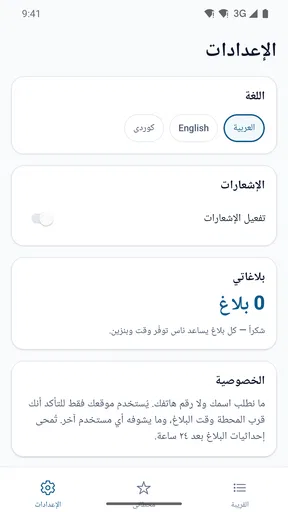
For household use, I would keep the setup simple: install the app on the device used for trip planning, then agree who will check it and when. The listing presents a compact local utility rather than a family-management tool, so I would not expect it to assign drivers, manage separate household profiles, or coordinate trips automatically. A shared phone can still be useful, but the household should decide how information is passed along.
That boundary matters when the device belongs to someone else or is used by several people. A person checking a station for another driver should communicate the status and the time it was checked, not just say “it’s open.” The timestamp context can change how much confidence the driver should place in the report. If the person driving cannot see the app, a short message with both the status and its freshness is more helpful than an unqualified recommendation.
I would not make it the only planning method for a driver who cannot easily verify a report or who is heading out with very little fuel. In that situation, the safer practical choice is to rely on a station they know or seek a current local confirmation. جلكان can inform a decision, but a household still needs a fallback when the displayed information is old or uncertain.
There is also a useful boundary between checking together and trying to make the app serve as a household log. I would not assume that one person’s earlier check is still a reliable record for someone leaving later. The next driver should make a fresh decision based on the information available at that time, rather than treating a saved message or remembered status as a live update. That approach keeps the tool’s role clear and reduces the chance that a well-meant handoff turns into misplaced confidence.
Age, trust, and what the rating tells me
The app is rated for Everyone, which makes its subject matter broadly suitable for household devices. That age classification does not mean every child should be responsible for making a driving or fuel decision; adults should remain in charge of the trip. I would be comfortable with a family member using it as a simple reference under an adult’s direction, while keeping route and safety decisions with the driver.
Its average rating is 4.7 from around 130 ratings, and it has 50K+ installs. Those figures suggest that people have found a reason to try a focused Mosul fuel-station tool, but they do not tell me whether a particular station’s current status is correct. For a service built around changing local conditions, the freshness of the individual check is more relevant to a trip than popularity alone.
The developer is TNLMS, and the app is free. It is currently version 1.0.4, with a minimum OS requirement of 7.0. The low-friction price makes it easy to try as a supplementary utility, though I would still judge it by whether the station information is useful for my own area and timing. Its short store label, جلكان, is brief; the practical purpose is clearer once I understand that it concerns fuel stations around Mosul.
For a household deciding whether to keep it on a shared phone, I would separate trust in the app’s purpose from trust in any one report. Its local focus is clear, and the information it aims to surface is directly relevant to a fuel stop. But a driver still has to judge whether a report is recent enough for the moment, and whether the displayed queue makes sense alongside distance and remaining fuel. That is a better basis for trust than assuming every status will stay accurate until arrival.
When I would choose something else
I would skip this app if I wanted comprehensive navigation, fuel-price comparisons, vehicle maintenance tools, or a directory spanning many cities. Its appeal is local and specific, so anyone travelling beyond Mosul should not assume it will answer the same questions elsewhere. Drivers who already have a dependable, up-to-date source for their usual station may also find that checking another app adds little to their routine.
It is also not ideal for a decision that requires certainty. Queue length and operating status can change between the check and arrival, and the last-checked time is a reason to evaluate a report rather than ignore its age. My advice is to use the app when a quick local comparison could prevent a wasted stop, while keeping a familiar alternative in mind if the report is not recent enough to trust.
It is a particularly poor substitute for planning a long drive, where the driver needs a dependable route and a broader understanding of stops along the way. In that case, I would use a navigation tool for the journey and treat this as a local check only if the trip brings me into its intended area. Likewise, if a household’s usual routine is already built around a station with reliable direct updates, adding another check may create more steps without changing the decision.
For a first try, I would use it on a low-pressure trip rather than waiting until the tank is nearly empty. That gives the driver room to compare the displayed information with what they find and decide whether it is useful for their own routine. If the local reports help them avoid an unnecessary stop, it has earned a place as a supplementary tool; if they do not, there is little reason to force it into every journey.
A measured household verdict
For a Mosul household sharing a car, جلكان makes sense as a small coordination aid. One person can check before departure, pass along the station’s reported state and how recently it was checked, and let the driver choose with that context in mind. That is a useful, realistic role—especially when a fuel stop is time-sensitive—but it is not a substitute for directions, direct local knowledge, or a backup plan.
I would recommend trying it if you regularly need to choose among fuel stations in Mosul and are willing to treat updates as helpful snapshots. I would not rely on it as the sole source when the information is old, the trip is outside its local scope, or a wrong choice would leave you stuck. Used with that boundary, it offers a focused answer to a very everyday question without asking a household to turn a simple fuel check into a complicated system.
My practical rule would be to use the app when there is enough time and fuel to make a sensible comparison, and to avoid letting a queue report push the driver into a risky detour. A nearby alternative, a current local confirmation, or a familiar station can be the better choice when the report seems dated. That is not a weakness unique to this tool; it is simply the trade-off that comes with relying on information about conditions that may change while you are on the road.
In that role, it is easy to understand why someone might keep it available without treating it as an essential driving app. It is free to try, focused on a specific local need, and most useful when the driver and the person checking communicate clearly. If that describes your household, I think it is worth considering. If you need an all-purpose motoring companion or coverage beyond Mosul, I would choose a broader alternative instead.
Pros
- Simple interface makes it easy to browse and use.
- Lightweight design should suit devices with limited storage.
- Useful for users looking for Arabic-language content.
- Can be a convenient option for quick
- on-the-go access.
- Straightforward features are easy for new users to learn.
Cons
- The app’s purpose and features are not clear from its name alone.
- Arabic-only content may be difficult for some users to navigate.
- Limited information about updates or ongoing support is available.
- Compatibility and performance may vary across devices.
- Check privacy permissions before sharing personal information.
FAQs for جلكان
What is جلكان, and what can I use it for?
The name جلكان alone does not clearly identify a specific app or game, so its purpose cannot be reliably described without more information. Before downloading, check the app-store listing for its developer, screenshots, description, and supported features. Those details can help you confirm that you have found the intended app rather than another product with a similar name.
Is جلكان available for Android and iOS?
Availability depends on the particular product and the country or region associated with your store account. Search for جلكان in Google Play or the Apple App Store, and compare the developer name and listing details before installing. If it does not appear, it may not be offered for your device or region; avoid unofficial download pages unless you can independently verify their safety and authenticity.
Is جلكان free to download, and does it include purchases or subscriptions?
The name by itself does not provide enough information to confirm whether جلكان is free, paid, or supported by in-app purchases or subscriptions. Review the store listing for the price, payment information, and any subscription terms before downloading. If a subscription is offered, check its renewal schedule and cancellation instructions so you understand potential ongoing charges.
What permissions or personal information might جلكان require?
Required permissions depend on the app’s actual functions, which cannot be confirmed from its name alone. Before installing, review the permissions shown by your device and the privacy information linked from the official store listing. Be cautious if an app requests access that seems unrelated to what it claims to do, and avoid sharing sensitive information unless the developer explains why it is needed.
How can I make sure I download the genuine version of جلكان?
Search for the app through the official Google Play or Apple App Store, then confirm that the title, developer, icon, and description match the product you intend to install. Check recent reviews and the developer’s other releases as well. Because جلكان cannot be uniquely identified from the name alone, do not assume that a similarly named app or third-party download is the right one.


